
Wondering which web browser gives you the smoothest ChatGPT experience? When your AI sessions lag, freeze, or demand system resources, it can seriously disrupt your pacing or worse, cost you valuable time.
| Selecting the right browser can mean the difference between fluid, responsive interactions and frustrating slowdowns in progress. |
For this read, we tested some of the best browsers, including Google Chrome, Firefox, and how they handle balance, speed, privacy, and resource usage while using ChatGPT.
Also, you will know recent news about ChatGPT 5’s great flaws.
Let’s explore your best browser for ChatGPT together!
What are Browser Benchmarks?
Browser benchmarks are standardized performance tests designed to measure how fast and efficient a web browser is at handling common tasks. Think of them as tests that determine how efficiently a browser can work in different conditions.
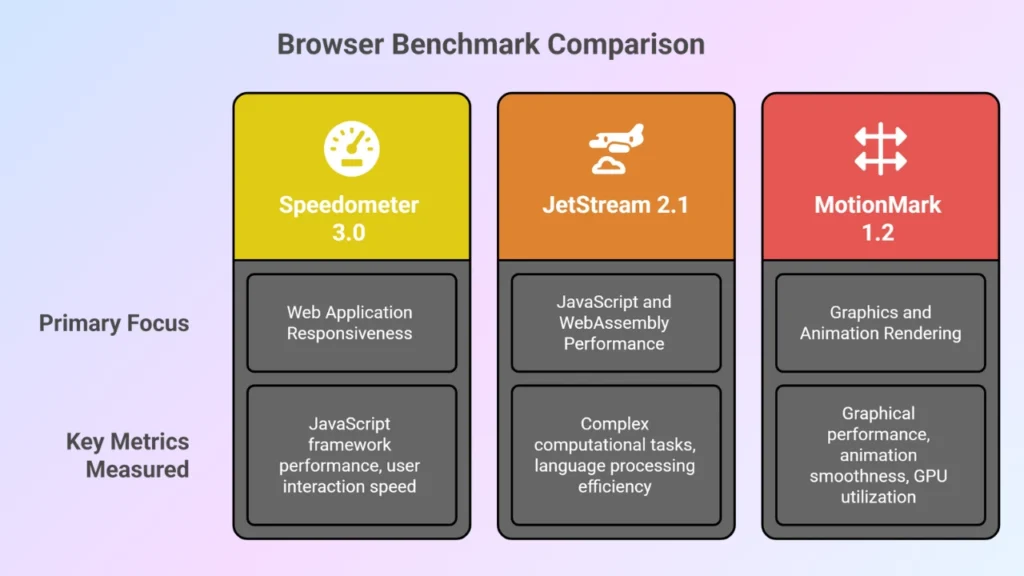
By analyzing browser benchmarks, we can easily understand how good it will perform while using ChatGPT.
Which Browser Makes ChatGPT Work Best in 2025? Top 7 Picks
We checked each of these browsers to determine which ones truly meet the most important performance and usability expectations.
| Browser | Performance Benchmark | Key Benefits | Best For |
|---|---|---|---|
| Google Chrome | Speedometer 320JetStream 275–MotionMark 890 | Huge extension library (productivity, AI tools), smooth ChatGPT UI, widely supported | Users who want speed + flexibility |
| ChatGPT Atlas | Speedometer ~310 JetStream ~270 MotionMark ~860 | Built-in ChatGPT sidebar, unified search + chat bar, Agent Mode for task automation, Chrome extension support | Power users, researchers, and professionals who want an AI-native browsing experience and automation built in. |
| Microsoft Edge | Speedometer 310JetStream 265MotionMark 870 | Built-in AI (Copilot), low memory use, PDF/Reader mode, Collections for research | Students, researchers, multitaskers |
| Mozilla Firefox | Speedometer 290JetStream 250MotionMark 850 | Strong privacy tools, customizable, lightweight extensions | Privacy-focused ChatGPT users |
| Safari (Apple) | Speedometer 280JetStream 240MotionMark 830 | Battery efficient, smooth integration with Apple devices, strong privacy | MacBook/iPhone/iPad users |
| Opera / Opera GX | Speedometer 300JetStream 260MotionMark 860 | Built-in VPN, ad-blocker, side messengers, Opera Aria (AI) | Users who like all-in-one tools |
| Brave | Comparable performance to Opera | Blocks ads/trackers, fast, built-in Leo AI assistant | Security-conscious, minimal setup |
| Vivaldi | Speedometer (107-108)JetStream (122-123)MotionMark 382 | Split-screen tabs, research-friendly notes, lots of customization, extension support | Power users & researchers |
1. Google Chrome
Google Chrome is fast and reliable. You can open multiple ChatGPT tabs without worrying about slowdowns. Its powerful JavaScript engine makes your AI interactions smooth and responsive.
You can use many extensions to enhance your ChatGPT workflow. Tools for productivity, note-taking, or research are easy to add. Chrome also syncs your bookmarks and settings across devices, so your AI sessions feel continuous.
The interface is simple and easy to navigate. You can create multiple profiles to separate work and personal use. Chrome keeps updating, which means you always get new features and security improvements.
If you wanna push your AI to make money, then Chrome is the best browser out there.
So, what’s in it for ChatGPT users? Well,
- Fast JavaScript engine for smooth ChatGPT interactions.
- Large extension library including AI, productivity, and note-taking tools.
- Syncs bookmarks, history, and settings across devices.
- Download extensions particularly made for ChatGPT.
- Supports multiple profiles to separate work and personal ChatGPT sessions.
- Regular updates ensure security and performance improvements.
- Smooth integration with Google Workspace apps for research alongside ChatGPT.
2. ChatGPT Atlas
In the landscape of legacy browsers like Firefox, Chrome, Brave, Edge, Atlas emerges as an innovative contender tailored for an AI-first workflow.
With Atlas, you get the full power of ChatGPT woven into your browsing experience.
A built-in sidebar lets you interact with the web page you’re on: ask questions, summarize content, compare items, or grab insights, all without switching apps.
What are the features that make ChatGPT Atlas outstanding?
- Interact with ChatGPT directly on any webpage
- You can summarize, rewrite, explain, or fact-check instantly.
- Type a URL or a ChatGPT prompt in the same bar.
- Atlas remembers your context and browsing patterns (if allowed).
- View ChatGPT results side-by-side with the webpage you’re studying.
- Save outputs, responses, and research notes directly into Atlas without external apps.
- Works with all Chrome extensions, keeping the power of a traditional browser with the intelligence of AI.
- Highlight data, simplify pages, and extract only what’s relevant.
2. Mozilla Firefox

Firefox is designed with privacy in mind. You can use ChatGPT without worrying about tracking or unwanted data collection. It also manages memory well, so you can keep multiple AI tabs open without performance issues.
This browser is highly customizable, meaning you can adjust the layout and add extensions to support your research or writing. Reader mode helps you focus on the content, while you master your ChatGPT 5 tricks and outputs.
Firefox is open-source and reliable. You can organize your tabs efficiently and use containers to separate different projects, while staying fast and secure.
It offers some great features as well,
- Strong privacy protections to prevent data tracking while using ChatGPT.
- Lightweight memory usage allowing multiple ChatGPT tabs to run efficiently.
- Simple interface to optimize workflow layout.
- Support for powerful add-ons like privacy-focused AI assistants.
- Multi-tab management with pinned tabs and containers.
- Reader mode for distraction-free research while referencing ChatGPT outputs.
- Open-source platform encouraging innovative ChatGPT integration tools.
3. Microsoft Edge
Most people will stick with Chrome, until they use the newest version of Edge. You should give it a try!
Edge is fast and efficient. You can run ChatGPT smoothly even with multiple tabs open. Its built-in tools like Copilot AI and Collections help you organize your work and research with ease.
Sleeping tabs save memory while keeping your ChatGPT sessions active. You can also use the built-in PDF viewer to read documents alongside your AI tasks. Edge supports many Chrome extensions, so you have flexibility. In this browser, prompt engineering also work great for developers.
The interface is clean and professional. Dark mode and immersive reader reduce eye strain during long AI sessions. Edge balances speed, productivity, and usability very well.
Here are some of the features you can work with,
- Built-in Copilot AI tools to complement ChatGPT tasks.
- Collections feature helps organize ChatGPT responses with web research.
- Sleeping tabs save memory while running multiple AI sessions.
- Integrated PDF viewer allows easy reference and annotation alongside ChatGPT.
- Smooth performance even with heavy JavaScript tasks.
- Edge extensions library supports AI-enhancing add-ons.
- Dark mode and immersive reader enhance focus during long ChatGPT sessions.
4. Safari
Safari works best if you use Apple devices. It is energy-efficient, so you can run ChatGPT without draining your battery. The browser is optimized for Mac, iPhone, and iPad.
It has strong privacy protections. Intelligent Tracking Prevention keeps your data safe. You can sync tabs across your devices to continue your AI sessions seamlessly.
Safari is simple and easy to use, plus the Reader Mode helps you focus on content and quickly reference ChatGPT outputs. Safari makes working with AI smooth and distraction-free.
Some its great feature includes,
- Optimized for Mac and iOS, offering energy-efficient ChatGPT use.
- Strong privacy protections including Intelligent Tracking Prevention.
- Smooth scrolling and rendering for responsive ChatGPT UI.
- Built-in password manager simplifies logging into AI services.
- Continuity feature syncs ChatGPT tabs across Apple devices.
- Fast loading of AI-powered web apps with minimal lag.
- Reader mode for distraction-free research alongside ChatGPT outputs.
5. Brave

As you can see, we placed Brave better for ChatGPT than Chorme simply because of it’s add blocker feature. Brave is fast and secure browser that enables you to block ads and trackers by default, so your ChatGPT sessions load quickly.
You can also use the built-in Leo AI assistant (Has some capabilities like ChatGPT Agent Mode) for extra help with prompts.It is lightweight, which makes it ideal for multiple AI tabs.
Brave supports Chrome extensions, so you can add productivity or research tools easily. You can also enable Tor mode for private browsing.
The interface is clean and easy to navigate. Dark mode helps reduce eye strain. Brave gives you speed, privacy, and simple usability for your ChatGPT work.
Brave offers some great features,
- Blocks ads and trackers by default, ensuring faster ChatGPT interactions.
- Built-in Leo AI assistant for quick reference and prompt ideas.
- Focused on lightweight performance for multiple ChatGPT tabs.
- Customizable privacy settings allow secure AI usage.
- Supports Chrome extensions for AI tools and workflow enhancements.
- Built-in Tor mode for anonymous ChatGPT access if needed.
- Dark mode and minimalistic interface reduce eye strain during extended use.
6. Opera
Opera is an all-in-one browser. You get a built-in VPN and side panels for messengers and notes. Just like most browsers, Opera also offers Opera Aria, its AI assistant, to complement your ChatGPT workflow.
Workspaces allow you to organize different ChatGPT projects. The snapshot tool helps capture AI outputs quickly. Opera runs smoothly even with multiple tabs and heavy web apps.
The interface is user-friendly. You can multitask efficiently and keep all your research and AI work organized. Opera is designed for productivity and convenience.
Some of Opera’s features includes,
- Built-in VPN for secure ChatGPT sessions.
- Sidebar allows quick access to messengers, notes, and ChatGPT simultaneously.
- Integrated ad blocker speeds up page loading.
- Opera Aria AI assistant enhances productivity while working with ChatGPT.
- Workspaces feature organizes multiple ChatGPT projects.
- Snapshot tool for capturing AI responses quickly.
- Efficient tab management for multitasking during research or writing.
7. Vivaladi

In the crowd of Firefox, Chrome, Brave, Edge, this browser can seem like a like a hidden gem!
With Vivaldi, you can arrange ChatGPT tabs, panels, and notes exactly how you like. Split-screen view helps you compare AI outputs easily.
It has built-in Notes to save responses and research from ChatGPT. Tab stacking and quick commands make managing multiple AI sessions simple. You can also integrate mail and feeds for research without leaving the browser.
The interface is friendly and professional. You can use keyboard shortcuts to speed up frequent tasks. Vivaldi gives you power, flexibility, and control over your AI workflow.
Features of Vivaldi includes,
- Perfectly intuitive interface for arranging ChatGPT tabs and panels.
- Built-in Notes panel to save ChatGPT outputs for later reference.
- Split-screen view enables comparing multiple AI outputs simultaneously.
- Quick commands allow fast navigation through ChatGPT sessions.
- Tab stacking keeps many ChatGPT threads organized.
- Customizable keyboard shortcuts speed up frequent AI actions.
- Mail and feed integration allows research alongside ChatGPT without leaving the browser.
Recent News about ChatGPT 5
August 7, ChatGPT’s initial launch week recieved great hype. But it was a short lived one!
The latest ChatGPT 5 update didn’t go according to plan, leaving many users underwhelmed. Instead of delivering the major improvements everyone was expecting, the rollout has faced criticism for performance hiccups, missing features, and a lack of clear innovation.
In simple, Chat GPT 5 was a bit of improvement than it’s previous predecerosies ChatGPT 4o. It’s nothing great like they advertised, created the false hype.
ChatGPT 5 Hype was Short Lived
Yep, the latest version of ChatGPT has many lackings, even considered worse than ChatPGT 4o by many users.
Right now, there are 5,228 signed petitions on Change.org urging the OpenAI development team to keep ChatGPT 4o available on their main platform.
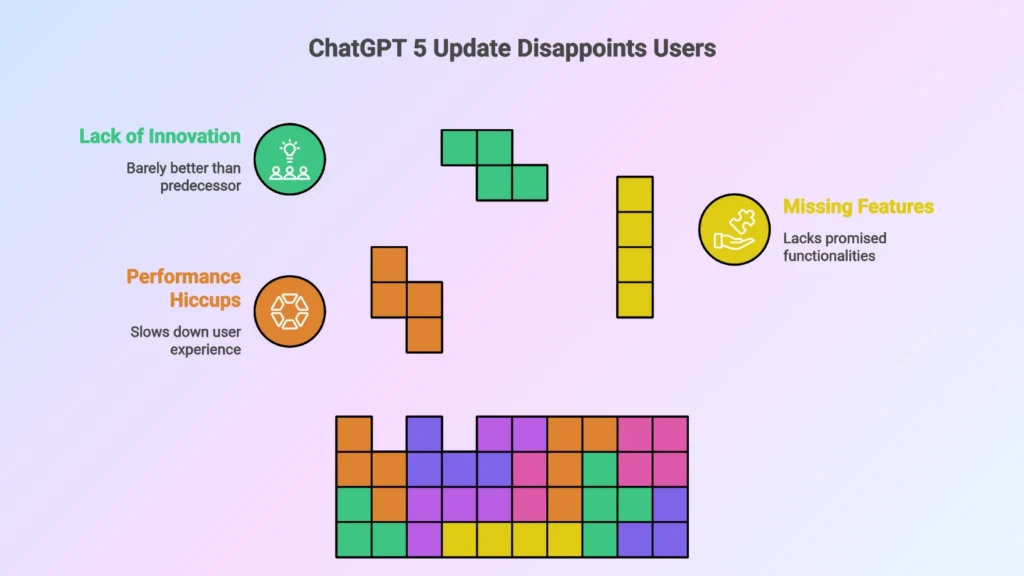
For a release that carried so much anticipation, the rollout raised more questions than it answered. Me, you and everyone else didn’t bought their excitement, and Altman’s story was nothing more than smoke and mirrors.
While some early adopters noted improvements in speed and accuracy in certain cases, the overall experience fell short of the promise.
Instead of feeling like a polished upgrade, GPT-5 came across as rushed and uneven, leaving many to wonder if the model had been released before it was fully ready.
GPT 5 Failures Show Where Work Is Needed
While ChatGPT 5 brought some upgrades in speed and flexibility, its early failures revealed critical gaps that OpenAI still needs to address.
Many users reported inconsistent outputs, hallucinations, and limited improvements in reasoning compared to previous versions.
A Reddit user named TheRealIronman shared his Opinions about ChatGPT, and oh my, he was extremely disappointed,
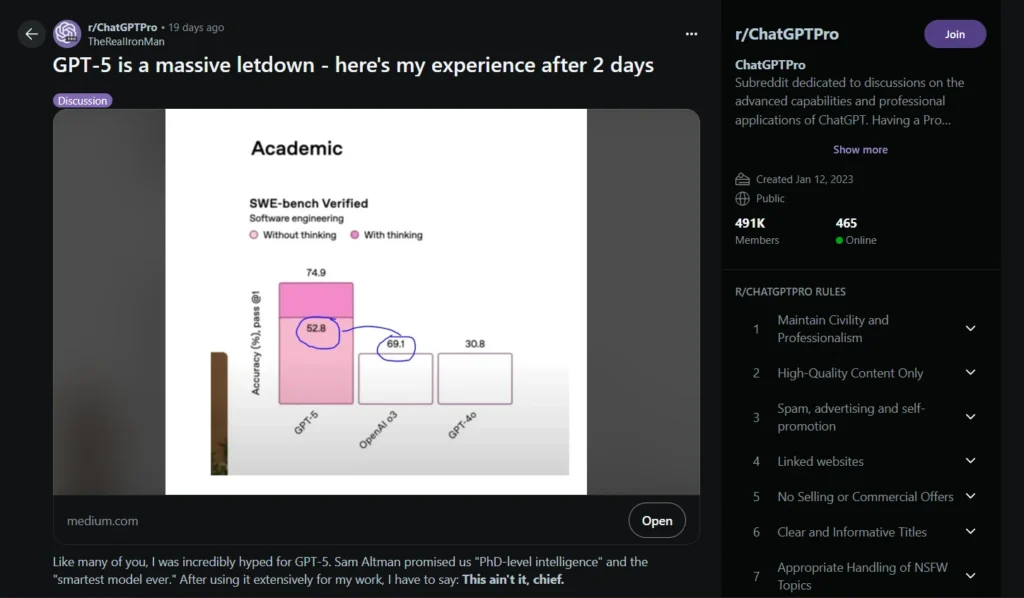
In his experience, he pointed out many problems within the model that needs to be addressed.
The Reddit user expresses strong disappointment with GPT-5. Expectations were high, with claims of “PhD-level intelligence” and superior performance, but real-world usage revealed major issues in speed, accuracy, and usability.
While GPT-5-mini performs well at lower cost, the main GPT-5 model struggles in comparison to previous models and competitors.
Key Takeaways
The Good
- GPT-5-mini performs as well as o4-mini at one-quarter the cost.
Suitable for some coding tasks, though not revolutionary. - 400k token context window is useful for large inputs.
The Bad
- GPT-5 is painfully slow (113.7s per SQL query vs Gemini 2.5 Pro at 55.6s).
- Lower average score (0.699) than Gemini 2.5 Pro (0.788).
- Worse success rate (77.78%) than nearly all tested models.
- “PhD-level intelligence” claims are unsubstantiated.
- Older models (o3, GPT-4.5, o4-mini) deprecated without warning.
- Users limited to 200 messages/week for GPT-5.
- Responses lack personality and depth.
The Ugly
- Hallucinations persist in practical tasks.
- Claimed safety improvements are ineffective.
- Slower, less accurate, and less reliable than older models.
Compared to some of it’s older model’s score are,
| Model | Median Score | Avg Score | Success Rate | Speed | Cost |
|---|---|---|---|---|---|
| Gemini 2.5 Pro | 0.967 | 0.788 | 88.76% | 55.6s | $1.25/M |
| GPT-5 | 0.950 | 0.699 | 77.78% | 113.7s | $1.25/M |
| o4 Mini | 0.933 | 0.733 | 84.27% | 48.7s | $1.10/M |
Overall, Users feel forced to adopt it due to the neglation of older models, leading to frustration and calls for OpenAI to address these problems.
ChatGPT 5 Didn’t Deliver on Expectations
We know how disappointing it was, so what was our expectations from ChatGPT 5? Well,
| Category | Expected Improvement | Purpose / Benefit |
|---|---|---|
| Intelligence & Reasoning | “PhD-level intelligence” with advanced problem-solving | Handle complex queries with expert-level understanding |
| Accuracy | Fewer errors in each output | Reliable and trustworthy outputs |
| Speed & Efficiency | Faster response times | Streamlined workflow and improved productivity |
| Context Handling | Larger context window (up to 400k tokens) | Manage long conversations and large data inputs effectively |
| Coding & Technical Tasks | Superior coding assistance across multiple languages | Support developers and technical users more effectively |
| User Experience | More natural, engaging, and personalized responses | Chat feels human-like and intuitive |
| Safety & Compliance | Enhanced safety protocols and ethical guidelines | Reduce harmful outputs and maintain user trust |
| Integration & Productivity Tools | Smooth integration with extensions and APIs | Allow seamless workflow with other apps and research tools |
| Accessibility & Flexibility | Support multiple devices, browsers, and platforms | Provide consistent experience on desktop, mobile, and web apps |
It’s not like ChatGPT was a complete failure, but it was not incredibly good either. While it showed some improvements in certain areas, the inconsistencies, slow performance, and unfulfilled promises felt disappointing.
Use these 50 Best Chat GPT Image Prompt for Marketing in 2025
FAQ
With ChatGPT, Most Modern Browsers Work Perfectly for Everyday Use
Using ChatGPT effectively depends a lot on the browser you choose. Chrome, Edge, and Opera GX give you the fastest performance, smoothest interface, and best support for extensions.
Firefox and Brave are great if you value privacy, while Safari works well for Apple users. Vivaldi is ideal if you want a highly customizable setup with features like split-screen tabs and built-in notes.
ChatGPT 5 shows some improvements, like a larger context window and GPT-5-mini’s efficiency, but slow responses, losing track of outputs, and the loss of some older models remain issues.
In the end, you can still get a lot from ChatGPT if you pick the right browser and understand its current limitations.
Recently Atlas arrived, what is your opinion on that?
Atlas is not helping much. What do you think?
Your article helped me a lot, Thanks!
Using Atlas, but it doesn’t wonder me yet. Hope the new updates can change it.