
Real project · Client identity protected
Magento to Shopify Migration: From Legacy Ecommerce to a Connected Platform
A Magento to Shopify migration case study: how complex product configuration, wholesale operations and custom integrations were brought together in one Shopify ecosystem.
This Magento to Shopify migration was delivered by Miraiyo and is published with the client’s written permission. Names, products, locations and figures that could identify the business have been removed or generalised.
Illustration of the system layers, not the client’s interface.
The short answer
This Magento to Shopify migration moved a made-to-order manufacturer from several Magento 2 storefronts to one Shopify store. Miraiyo rebuilt the custom Magento modules as a custom Shopify app, Shopify Functions and checkout extensions, so retail and B2B buying, configurable products and the link to the production system kept working. Historical orders stayed available in a separate archive, and failed orders are retried and reconciled automatically.
- From Magento 2, several storefronts
- To One Shopify store with a custom app
- Buyers Retail (B2C) and trade (B2B)
- Core work Migration, custom app, Functions, integrations
Project overview
A Magento to Shopify migration for a made-to-order business
The client is a made-to-order manufacturer of configurable products, selling to retail customers and to trade and wholesale buyers. Its online business ran on several Magento 2 storefronts held together by custom modules. Moving to Shopify meant keeping every one of those business rules working from day one. The work sits within our Shopify Growth & Engineering practice and our wider web development services.
- Business model
- B2C and B2B
- Legacy platform
- Magento 2, multiple storefronts
- New platform
- One Shopify store with a custom app
- Project type
- Migration and custom engineering
- Focus
- Configuration, integration and operational continuity
- Delivered by
- Miraiyo
- Evidence type
- Real client project, described anonymously with written permission
Before
- Several Magento 2 storefronts
- Custom modules for order transfer, pricing and trade accounts
- Order history held in the legacy platform
After
- One Shopify store for retail and trade
- A custom Shopify app, Shopify Functions and checkout extensions in place of the old modules
- Past orders kept in the app’s own archive, apart from live orders
The business challenge
Shopify’s speed, without losing years of custom rules
The business wanted Shopify’s speed and lower running effort. Out of the box, though, Shopify could not do most of what the old setup did. (If you are still choosing a platform, our guide to the best ecommerce platform for small business compares the options.)
Replacing legacy commerce without abandoning operational rules
Years of custom Magento logic decided prices, product codes, ship dates and who could buy what. All of it had to work on Shopify from launch.
Supporting highly configurable products
Shopify variants stop at a handful of options. Each product here has dozens of choices, and almost every choice changes the price.
Connecting online orders to back-office operations
Every paid order had to reach the production system with the exact build details, the right product code and an estimated ship date. Shopify has no built-in link to such a system.
Managing B2C and B2B customers in one ecosystem
Retail and trade buyers needed different prices, different checkout rules, and company accounts with several users.
Preserving access to historical customer and order information
Customers and staff still needed past orders. By default, Shopify apps can only read orders from the last 60 days, and older orders need extra, approved access.
Recovering failed automation and missed events
A missed order means a product that never gets made. The new setup had to catch failed sends and missed events, and recover from outages on its own.
Engineering architecture
One store, one integration app, one source of production truth
Instead of one large plugin, the work was split into a small set of focused parts. At the centre is a custom Shopify app that sits between the store and the operations system. It follows the same server-side approach as our Shopify Admin API engineering demonstration.
Technology used in the Magento to Shopify migration
- StoreShopify for retail and Shopify B2B, with a custom Liquid theme
- App back endLaravel (PHP), MySQL and background job queues
- App adminReact, Shopify Polaris and App Bridge, running inside Shopify admin
- Inside checkoutShopify Functions for cart pricing, discounts and checkout validation, plus checkout and customer account UI extensions
- Shopify APIsAdmin GraphQL API, webhooks, app proxy and Shopify Flow, with legacy REST calls only where an existing integration needed them
- Connected toolsA third-party 3D configuration platform, a CRM, and no-code form and workflow tools
What was engineered
Eight pieces of engineering, one connected system
The Magento to Shopify migration needed eight pieces of engineering. Choose an area to see the challenge, the engineering approach and the practical value it gives the business.
Legacy commerce migration
- Challenge
- Several Magento 2 storefronts, years of orders and customer accounts, and custom modules the business relied on every day.
- Engineering approach
- The Magento to Shopify migration moved customers and orders to Shopify, and the custom Magento modules were rebuilt as a Shopify app and Shopify Functions instead of being dropped.
- Business value
- One store to run in place of several, with the same business rules and the order history still in reach.
Custom Shopify app
- Challenge
- The old platform pushed orders to production through a custom module. Shopify has no equivalent.
- Engineering approach
- A custom app with a Laravel back end and a React, Polaris and App Bridge admin that runs inside Shopify. It handles orders, B2B accounts, emails, order history, logs and settings.
- Business value
- The rules that make the business different live in one maintainable place, managed from Shopify admin.
Product configuration and pricing
- Challenge
- Products with dozens of options, where almost every choice changes the price.
- Engineering approach
- A third-party 3D configurator supplies the options and prices. A server-side check recalculates every order’s price, and a separate options app covers simpler products using the same pricing rules.
- Business value
- Shoppers see exactly what they are buying, and a tampered cart price is caught and held for review instead of slipping through.
Retail and wholesale account management
- Challenge
- Two very different buyer groups in one store, with trade buyers who need company accounts, several users and approvals.
- Engineering approach
- Once staff approve a trade application, the app creates a full Shopify B2B company with the right catalog, pricing and permissions. Company admins add users and choose what each person may do.
- Business value
- Trade accounts are set up without manual steps, and each buyer sees the right prices and options.
Checkout extensibility
- Challenge
- Custom pricing, wholesale discounts and buying rules had to run inside Shopify’s own checkout, without the old platform’s freedom to edit checkout code.
- Engineering approach
- Shopify Functions for cart pricing, discounts and checkout validation, plus checkout and customer account UI extensions, all using Shopify’s supported extension points.
- Business value
- Wholesale buyers see their saving as a separate discount line next to the retail price, everywhere Shopify shows an order.
Operational integration
- Challenge
- Every paid order had to reach the production system complete and correct, with no retyping.
- Engineering approach
- The app builds a production order with every chosen option, a generated product code, customer and shipping details and an estimated ship date. Orders with several made-to-order items become linked production orders, one per item. Status comes back as production moves on.
- Business value
- No manual order entry, and staff and customers see production progress in Shopify.
Automated recovery and monitoring
- Challenge
- Network errors, outages and missed webhooks happen. Each one could mean an order that never gets made.
- Engineering approach
- Background queues retry failed sends, staff get one clear alert per problem, and a scheduled reconciliation check finds orders whose events never arrived. Every request and response is logged with personal data masked.
- Business value
- Problems are visible and recoverable: staff can search the log and resend an order with one click.
Customer account enhancements
- Challenge
- Customers needed to see their own configured product, follow its progress and reach support about a specific order.
- Engineering approach
- An image of the buyer’s own design appears in the cart, at checkout, on the thank-you page and in the confirmation email. Customer accounts show past orders, order status and support requests linked to an order. Cart-recovery emails show the configured design, go only to customers who agreed to marketing, and include one-click unsubscribe.
- Business value
- A clearer journey after purchase, and support requests that reach the production team with the order attached.
Product configuration
Configure in the browser, verify on the server
Shoppers built their product in an interactive 3D configurator, and every order’s price was recalculated on the server before it went further. The concept below shows the same idea with an invented object and illustrative prices.
Concept model: an invented object, not the client’s product
Server-side price check
- Price in the cart
- —
- Recalculated on the server
- —
—
- The buyer’s design image follows the order: cart, checkout, thank-you page and confirmation email
- The same pricing rules cover a simpler options app for less complex products
Shopify B2B workflows
Trade buying without manual account setup
In this Magento to Shopify migration, trade buyers apply once. After staff approval, the rest of the account is created and permissioned automatically.
- 1Trade applicationA short form from the buyer
- 2Staff approvalThe business reviews the application
- 3Company createdShopify B2B company with catalog, pricing and permissions
- 4Team users addedThe company admin sets what each person may do
- 5Approval requestA team member submits a cart; the approver is emailed
- 6Review and payThe approver checks the order and completes it
What was built
- Company account creation after approval
- Wholesale catalogs and customer-specific pricing
- Company users with permissions to place a draft order, check out or view company orders
- Approval requests from a team member to an approver
- The retail price and the wholesale saving shown as separate lines
- A paid rush-production option for retail or trade buyers
Plan note
Shopify B2B is available on the Basic, Grow, Advanced and Plus plans. Some features are Plus-only, including catalogs assigned directly to companies, deposits and partial payments, and more than three active catalogs. Net payment terms and draft orders work on all four plans.
Custom apps that contain Shopify Functions also need Shopify Plus. We confirm plan requirements for every project before we promise a feature.
Connected operations
From paid order to production, and back again
Every order follows the same path. Each step is logged, and anything that fails is retried or flagged, never silently dropped. We apply the same thinking to AI agents and workflow automation.
- Order placedPaid order received from Shopify
- ValidationPrice and build details checked
- Secure integrationQueued and sent to production
- Operational processingProduct code, ship date, one order per made-to-order item
- Status synchronisationEach production stage reported back
- Customer updatesThank-you page, account and emails
How failures are handled
- Queueing
- Orders are processed by background jobs, so a slow or unavailable system does not block checkout.
- Retries
- Failed sends retry automatically. Staff get one clear alert per problem, not a flood of emails.
- Reconciliation
- A scheduled check looks for paid orders whose events never arrived, for example during an outage, and sends them.
- Audit logs
- Every request and response is recorded with personal data masked, and staff can search it.
- Exception handling
- Price mismatches are held for review, and any order can be resent with one click.
Ship dates come from rules the team edits on one settings screen: standard and rush production, special finishes, holidays and supplier lead times.
Recovery simulation
Invented data that shows how the recovery works. Not a real log.
Migration and continuity
Magento to Shopify migration without losing order history
Past orders mattered to customers and staff, but they must never reach the production system a second time. The migration kept them available and safely apart. For the catalog side of a move, see our catalog QA demo, which uses synthetic sample data.
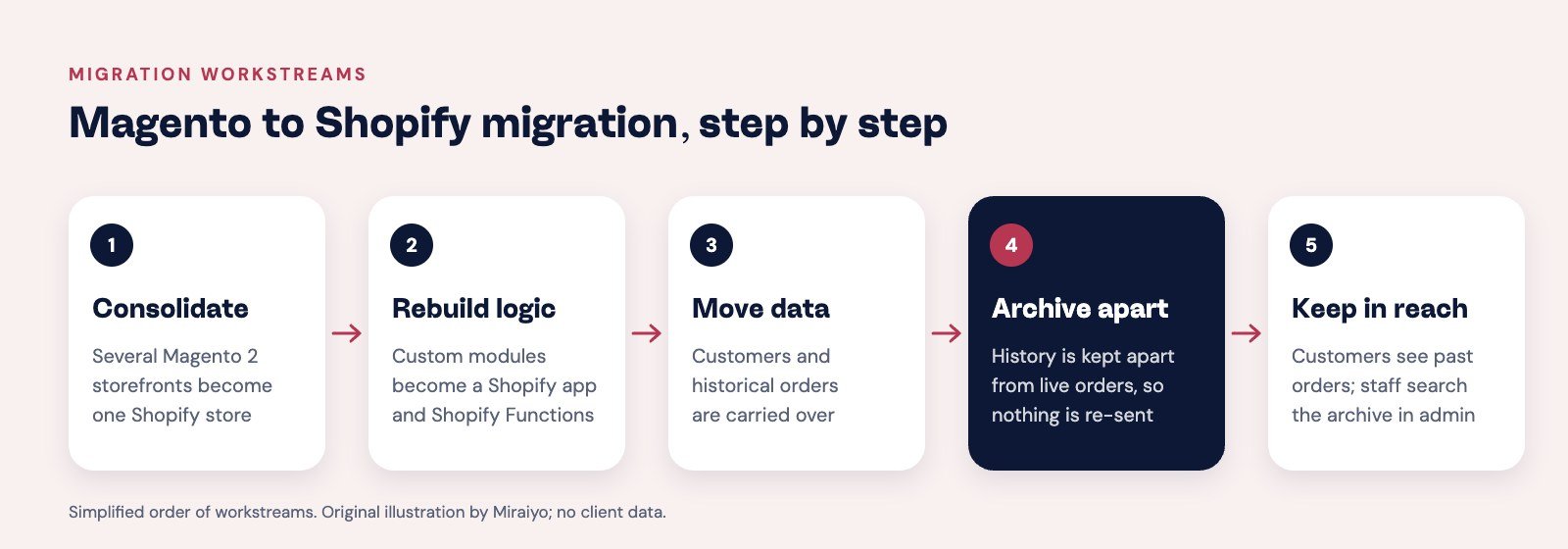
- Consolidate
Several Magento 2 storefronts became one Shopify store serving retail and trade buyers.
- Rebuild custom logic
Custom Magento modules were rebuilt as a Shopify app and Shopify Functions, so the business rules carried over.
- Move customers and orders
Customer accounts and historical orders were carried over from Magento.
- Archive apart from live orders
Historical orders sit in the app’s own archive, kept apart from live orders so none can be sent to production again.
- Keep history in reach
Customers see a “Past orders” view in their account, and staff can search the archive inside Shopify admin.
These are the migration workstreams in a simplified order. Dates, volumes and downtime figures are not published.
Outcomes and evidence
What the Magento to Shopify migration enabled
These are capabilities delivered and documented in the project. They are not independently measured business metrics. We don’t publish revenue, conversion, traffic, speed or cost figures for this project.
- Consolidated commerce operationsRetail and wholesale run from one Shopify store instead of several legacy storefronts.
- Automated transfer of order informationBuild options, product codes and ship dates flow to production without retyping, and status flows back.
- Retail and wholesale workflow supportApproval, company setup, team users, pricing and order approvals run without manual setup steps.
- Historical order accessCustomers and staff can reach past orders without risk of re-sending them to production.
- More connected customer accountsCustomers see their own design from cart to confirmation email, and can follow it through production.
- Operational failure handlingRetries, one alert per problem and scheduled reconciliation are built in, so failures are caught and recoverable.
The team also changes ship-date rules, product-code mappings and form-driven workflows from their own settings screens, without waiting for a developer. Ongoing upkeep is covered by our ecommerce website maintenance services.
Lessons for other Shopify merchants
Lessons from a complex Magento to Shopify migration
Custom commerce needs more than a theme. These lessons apply to any store with rules Shopify can’t express out of the box.
Architecture first
Decide where each rule lives: theme, Shopify Function, app or back-office system. That choice shapes everything else.
Preserve business rules
A migration succeeds when the team notices no gaps. List every custom rule before the move, not after launch.
Build for maintenance
Settings screens, readable logs and mappings let the team adjust the system without a developer for every change.
Secure integrations
Verify prices on the server, mask personal data in logs, and keep credentials out of the browser.
Expect failure
Queues, retries and reconciliation turn outages into delays instead of lost orders.
Plan for long-term support
Shopify’s APIs change four times a year, so custom work needs an owner after launch.
Questions merchants ask
What makes a complex Magento to Shopify migration difficult?
The data is usually the easy part. The hard part is the custom behaviour built up in Magento modules: pricing rules, account types, order routing and integrations. Each one needs a Shopify equivalent, often a Shopify Function, a custom app or a configured Shopify feature, before launch. Order history also needs a plan, because apps can only read the last 60 days of Shopify orders by default.
How can Shopify work with custom operational systems?
Through a custom app. Shopify sends webhooks when orders are paid, the app turns them into the format the other system expects, sends them through a queue with retries, and writes status updates back to Shopify through the Admin GraphQL API.
What can Shopify Functions and custom apps do?
Shopify Functions run custom logic inside Shopify’s checkout: cart pricing and transforms, discounts, and checkout validation. Custom apps handle everything that lives outside checkout, such as integrations, admin screens, background jobs and data storage. Custom apps that contain Functions need Shopify Plus. Changing a cart line’s price with a cart transform is limited to Shopify Plus and development stores.
How can one Shopify store support B2C and B2B buyers?
Shopify B2B adds companies, company users, catalogs, price lists and payment terms on the same store as retail. Custom logic can automate company setup after approval and add approval workflows. Feature limits vary by plan, so the plan is checked first.
How can order processing recover from outages?
Process orders in background queues, retry failed sends automatically, alert staff once per problem, and run a scheduled reconciliation that finds paid orders whose events never arrived. A searchable log with one-click resend handles the rest.
Will a Magento to Shopify migration hurt SEO or AI search visibility?
It can, if URLs, redirects, structured data and content are not planned before launch. Map every old URL to its new one, keep product and category content, and check that search engines and AI crawlers can still read the store. Our AEO and GEO services cover visibility in Google AI Overviews and ChatGPT, and the free AI visibility checker shows whether AI crawlers are blocked.
Is Shopify Plus required for Shopify B2B?
No. Shopify B2B is available on the Basic, Grow, Advanced and Plus plans, but some features are Plus-only, such as catalogs assigned directly to companies, deposits and partial payments. Custom apps that contain Shopify Functions also need Shopify Plus.
How much does a Magento to Shopify migration cost?
It depends on the number of custom modules, integrations and the data to move, so we quote each project on scope rather than publish a fixed price. Use the instant quote calculator for standard Shopify work, or contact us for a technical scope review.
When does a Shopify merchant need custom engineering?
When the business relies on rules Shopify and its apps can’t express: configurable products with calculated prices, trade accounts with approvals, links to production or ERP systems, or history that must survive a migration. If a workaround needs staff to retype data, it is usually worth engineering properly.
Your store should support the way your business actually works.
Planning a Magento to Shopify migration, or custom work on an existing store? Tell us what your store needs to do. We’ll tell you honestly how we would build it, and what your Shopify plan allows.
Related evidence and references
Other Shopify evidence, labelled by type: internal Shopify Admin API engineering demonstration · catalog QA demo with synthetic sample data.
Shopify documentation: Shopify Function APIs · Cart Transform · Checkout apps and plans · B2B features by plan · Access scopes and order history · REST Admin API status. Checked 21 November 2026.